
With the average web page made up of more than 50 objects (Krishnamurthy and Wills 2006), object overhead now dominates the latency of most web pages (Yuan 2005). Following the recommendation of the HTTP 1.1 specification, browsers typically default to two simultaneous threads per hostname. As the number of HTTP requests required by a web page increase from 3 to 23, the actual download time of objects as a percentage of total page download time drops from 50% to only 14% (see Figure 1).
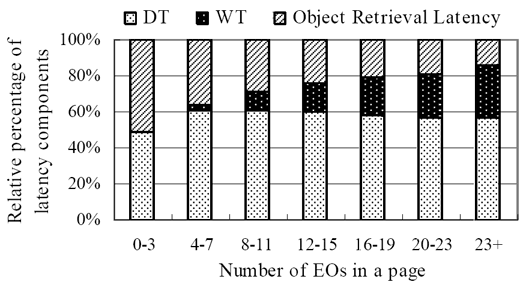
Figure 1: Object Retrieval Latency versus Number of Objects (used with permission)
As the number of objects per page increases above four, the overhead of waiting for available threads and describing the object chunks being sent dominates the total page load time (80% to 86% at 20 and 23+ objects respectively), compared to the actual object retrieval time due to file size. The description time plus the wait time caused by limited parallelism contribute from 50% to 86% of total page retrieval delay. Chi and Li also found that once the number of embedded objects exceeds ten, the description (or definition) time increases to over 80% of the total object retrieval time (Chi and Li 2002). Note that you can significantly reduce the overhead of multiple objects (for more than 12 objects per page) by turning on keep-alive and spreading the requests over multiple servers (Hopkins 2007).
Parallel Download Default Throttles Browsers
The HTTP 1.1 specification, circa 1999, recommends that browsers and servers limit parallel requests to the same hostname to two (Fielding et al. 1999). Written before broadband was widely adopted, this specification was designed for narrowband connections. Most browsers comply with the multithreading recommendation of the specification, although downgrading to HTTP 1.0 boosts parallel downloads to four. So most web browsers are effectively throttled by this limit on parallel downloads if the objects in the web page they download are hosted on one hostname. There are two ways around this limitation:
- Serve your objects from multiple servers
- Create multiple subdomains to serve from multiple hostnames
Using Multiple Servers
You can, of course, set up multiple object or image-hosting servers to boost the number of parallel downloads. For example:
images1.domain.com
images2.domain.com
images3.domain.com
Each of these subdomains does not have to be on a separate server, however.
Using Multiple Hostnames on the Same Server
A more elegant solution is to set up multiple subdomains that point to the same server. This technique fools browsers into believing objects are being served from different hostnames, thereby allowing more than two-threads per server. For example you can set:
images1.domain.com  domain.com
images2.domain.com  domain.com
images3.domain.com  domain.com
within your DNS zone record. Now you can reference different objects using different hostnames, even though they are on the same server! For example:
<img src="images1.domain.com/i/balloon.png" alt="balloon">
<img src="images2.domain.com/i/flag.png" alt="flag">
<img src="images3.domain.com/i/star.png" alt="star">
All of these URLs point back to:
domain.com/i/Optimum Number of Hostnames to Minimize Object Overhead
Two studies conducted by Yahoo! and Gomez demonstrate how increasing the number of hostnames can minimize parallel download delays. Steve Souders and Tenni Theurer of Yahoo! reported on a test in their Performance UI blog (Theurer and Souders 2007). Varying the number of hostnames, as well as object size, the Yahoo! engineers found that two hostnames gave the fastest response times for larger file sizes (see Figure 2). Theurer provided WSO with an updated figure showing the trends for response times versus the number of aliases and image file size.
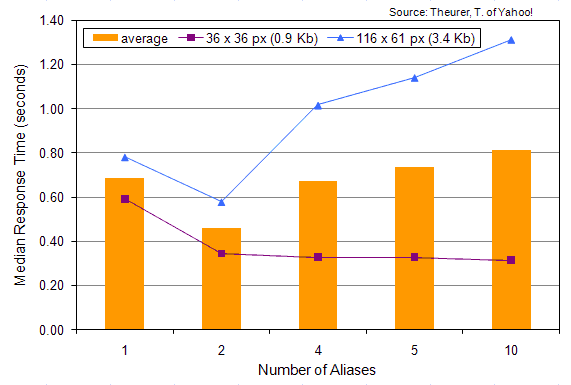
Figure 2: Median Response time versus Number of Aliases (used with permission)
Ryan Breen of Gomez ran a test using a similar technique. He found a 40% improvement using three hostnames (see Figure 3).
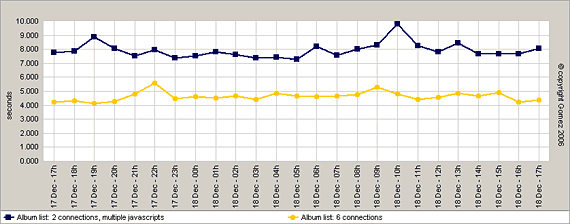
Figure 3: Total page load time versus number of connections (2 and 6) (used with permission)
Conclusion
With the average web page growing past 50 external objects, minimizing object overhead is critical to optimize web performance. You can minimize the number of objects by using CSS sprites, combining objects to minimize HTTP requests, and suturing CSS or JavaScript files at the server. With today’s faster broadband connections, boosting parallel downloads can realize up to a 40% improvement in web page latency. You can use two or three hostnames to serve objects from the same server to fool browsers into multithreading more objects.
Further Reading
- Breen, R., “Circumventing browser connection limits for fun and profit,”
- Ajax Performance, Dec. 18, 2006, http://www.ajaxperformance.com/?p=33 (Dec. 24, 2007). Shows the benefits of using more than 2 connections per hostname when optimizing Ajax applications. Realized a 40% speedup in download times by dynamically assigning different subdomains to objects programmatically.
- Chi, C., and X. Li, “Understanding the Object Retrieval Dependence of Web Page Access,”
- Proceedings of the 10th IEEE Int’l Symp. On Modeling, Analysis, & Simulation of Computer & Telecommunications Systems (MASCOTS’02). The CT (connection time) makes up from 6 to 17% of web object retrieval latency (send request to first byte received).
- Fielding, R., et al., “Hypertext Transfer Protocol — HTTP/1.1,”
- World Wide Web Consortium, June 1999, http://www.w3.org/Protocols/rfc2616/rfc2616.html (Dec. 24, 2007). Specifies the HTTP 1.1 protocol, which defines how web servers interact with web browsers. The specification includes persistent connections to boost performance. The specification also recommends a maximum of 2 connections per hostname, which most browsers support.
- Hopkins, A., “Optimizing Page Load Time,”
- Shows some simulations of multiple hostnames, object size, and latency on effective download speed.
- King, A., “Combine Images to Save HTTP requests,”
- Website Optimization, LLC, Speed Tweak of the Week, May 31, 2006. Learn how to combine adjacent images and imagemap to save HTTP requests. This speed optimization technique saves round trips to the server for faster load times.
- King, A., “CSS Sprites: How Yahoo.com and AOL.com Save HTTP Requests,”
- Website Optimization, LLC, Speed Tweak of the Week, Sept. 26, 2007. Learn how top sites use CSS sprites to improve website performance. Yahoo! and AOL.com use CSS sprites to save HTTP requests in their sites.
- King, A., “Minimize HTTP Requests,”
- Website Optimization, LLC, Speed Tweak of the Week, Dec. 13, 2003. Combine CSS or JavaScript files to save HTTP requests before uploading to the server, to avoid the same-domain connection limit.
- Krishnamurthy, B. and C. Wills, “Cat and Mouse: Content Delivery Tradeoffs in Web Access,”
- WWW 2006, May 23-26, 2006, Edinburgh, Scotland. Using an instrumented Firefox browser to test the top 100 Alexa pages in 13 categories the researchers found that extraneous content exists on the majority of popular pages, and that blocking this content buys a 25-30% reduction in objects downloaded and bytes, with a 33% decrease in page latency. Popular sites averaged 52 object per page, 8.1 of which were ads, served from 5.7 servers.
- Theurer, T., and S. Souders, “Performance Research, Part 4: Maximizing Parallel Downloads in the Carpool Lane,”
- Yahoo! User Interface Blog, April 11, 2007, http://yuiblog.com/blog/2007/04/11/performance-research-part-4/ (Dec. 24, 2007). Shows how for larger files 2 is the optimal number of aliases to enable 4 parallel downloads of external objects.
- Yuan, J., Chi, C.H., and Q. Sun, “A More Precise Model for Web Retrieval,”
- WWW 2005, May 10-14, 2005, Chiba, Japan.. The researchers found that the Definition Time (DT) and Waiting Time (WT) of objects have a significant impact on the total latency of web object retrieval, yet they are largely ignored in object-level studies. The DT and WT composed from 50 to 85% of total wait time, depending on the number of objects in a page. Above four objects per page, “object overhead” dominates web page latency.
does it make a difference if you use third or fourth-level subdomain? For example, can you still gain parallel downloading benefits if you use the following structure:
www1.images.domainname.com
www2.images.domainname.com
www3.images.domainname.com
www4.images.domainname.com
would http://www.something.com and something.com be 2 different domains?
dkbugger,
hi, no i don’t believe so. as long as the hostnames are different. so a sub-sub domain would work like a sub-domain.
On most domains www. redirects (Rewrites) to the domain.com so http://www.domain.com shows the same content as domain.com. I would use something like www1.domain.com and www2.domain.com i have seen this done on some really high trafficked websites before and is what i think I’m going to do on mine, as my page is taking 37s to load on a 56k and that’s just to long….
As I’m thinking about this a question comes to mind, is there anything that will just randomly pick 1 out of 2 or 3 sub-domains for each request? Link a server mod or something?
Email me if you know of anything that can do this.
David M.
http://www.domain.com and domain.com are both valid hostnames – for most sites they serve the same content (as they should) www1.domain.com www2.domain.com www3.domain.com Are all valid “subdomains” aka hostnames — these hosts can be configured to serve web traffic.
There is no difference if you add another level deep to the host name www1.images.domainname.com — this too is a valid host name (or subdomain).
Q: Is there anything that will just randomly pick 1 out of 2 or 3 sub-domains for each request? Link a server mod or something?
A: Round robin DNS each pick a DNS entry for a single dns request So you would have 3 hosts — (host1 host2 host3) all configured to server pages for http://www.domain.com In which case the DNS system returns one of 3 different IP addresses when asked for a response to resolve http://www.domain.com
The thing to remember here is a server (hardware device) will have a hostname – host1.domain.com
This host can be configured to serve pages for domain.com / http://www.domain.com Using Round robin DNS (poor man’s load balancer) the request for pages from domain.com would be directed to host1 or host2 or host3 …..
You can also save each request made in your database, including a timeframe, as in unix timestamps for visit time plus salt. This you must do for each server.
Then use your favorite scripting language, like php, to pick the server that is the least busy. Be sure to have some garbage collector in place for entries that pass the time limit.
It’s not an ideal solution, since it just takes up server resources instead. But in some cases it might still be worth it.
Just be sure to avoid breaking your 304 not modified header, you should be able to do this using the Etag.
in case that images are uploaded by users how can I specify to upload to subdomain 1 ,2 or 3? The images are generated on homepage automatic
How do I set up multiple subdomains that point to the same server within my DNS zone record? Why not just leave the subdomains as they are, so that they point to domain.com/folder1, domain.com/folder2 and domain.com/folder3 ?
so. http://www.domain.com and www2.domain.com will be two different domains. and to make www2.domain.com I have to make a subdomain named www2. So, in this case it’s worth the optimization? Thank you!
How can I implement this in an environment that serves it’s content from different domains like
product.company.com
product.company.co.uk
product.company.de
product.company.fr?
The URLs for included css, js and images are relative to those domains.
I could use 2 subdomains to server static contents which would work for e.g. all european derivates of the product with lets say static.company.de and .co.uk. But including images this way would also root the non-european derivates to get their content from the eu-cluster.
Any solutions for this?
Is there a way to rewrite all urls in a document before sending it to the client?
Thx for feedback.